The “vintage paper collage video AI” animation style has taken over social media. It’s tactile, highly engaging, and stops users mid-scroll. However, premium tools like Seedance 2.0 can quickly become expensive if you are experimenting or working on a budget.
The good news? You can achieve this premium stop-motion aesthetic entirely for free. In this guide, I will show you how to generate a custom vintage collage image using Gemini and animate it piece by piece using MindVideo (the perfect free alternative to Seedance).
The Workflow Overview
To create this video completely free, we break the process into three simple stages:
- The Vision: Generate a base image with distinct vintage textures using Gemini.
- The Animation Strategy: Ask Gemini to engineer a precise prompt that forces the video engine to build the elements sequentially.
- The Rendering: Feed both into MindVideo’s free model to bring the paper layers to life.
Step 1: Create Your Base Image in Gemini
First, we need a high-quality static image that contains the exact elements we want in our collage. Open up Gemini and use a detailed prompt that dictates textures, materials, and themes (like coding, coffee, and paper scraps).
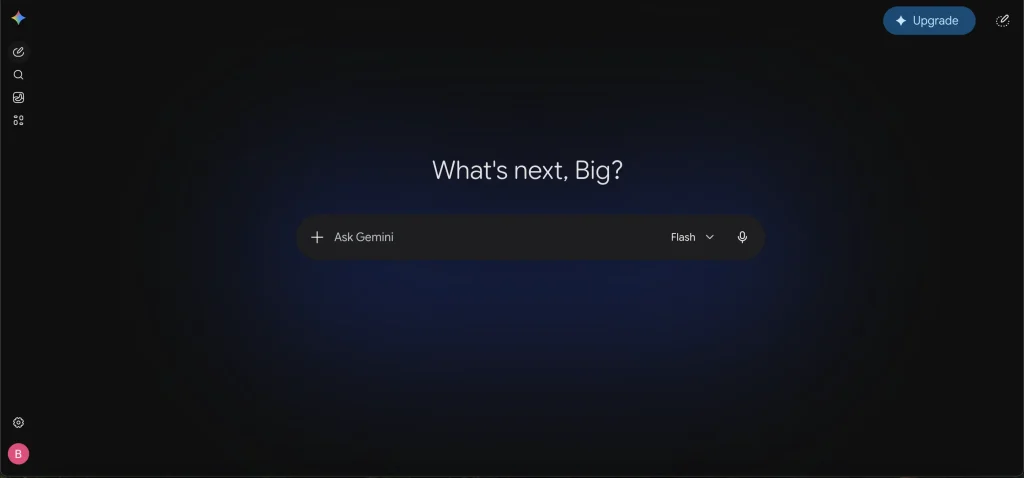
The Gemini Image Prompt to Use:
A high-quality vintage handcrafted paper collage. The composition includes torn paper layers, textured masking tape, old notebook scraps, a minimalist programmer cutout, a retro computer illustration, a coffee mug, vintage books, and coding notes scattered neatly. Soft shadows underneath the paper layers to give it a 3D depth. Earthy tones, warm lighting, and a cardboard texture background.
Once Gemini generates your image, download it to your device. We will use this as our reference layout.
Step 2: Let Gemini Write Your Animation Prompt
The secret to making paper appear “piece by piece” is the text prompt you give to the video generator. Instead of guessing, you can ask Gemini to write it for you.
Simply ask Gemini: “Give me an image-to-video prompt to animate this image as a vintage collage video where the paper pieces and elements appear step by step in a stop-motion style.”
Gemini will output a highly descriptive prompt tailored for video AI models. Here is the exact prompt engineered for this look:
The Animation Prompt:
Vintage handcrafted paper collage assembling itself piece by piece. Torn paper layers, masking tape, notebook scraps, programmer cutout, computer, coffee mug, books, and coding notes appear one by one with realistic stop-motion jitter. Subtle camera shake, paper textures shifting, and nostalgic analog feel.
Step 3: Animate for Free in MindVideo
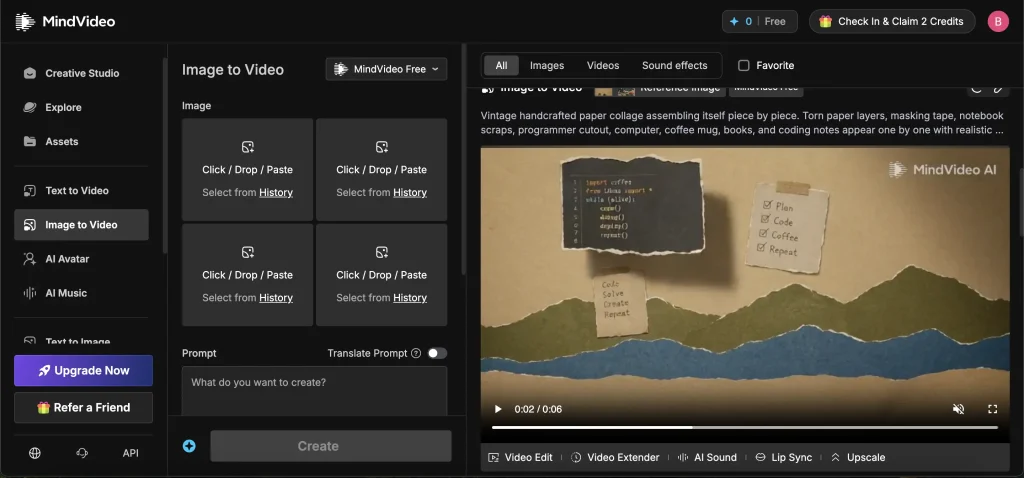
With your reference image from Step 1 and your animation prompt from Step 2 ready, head over to MindVideo—the ultimate free alternative to paid platforms like Seedance 2.0.
- Navigate to the Image to Video tab on the left sidebar.
- Select MindVideo Free from the model dropdown menu at the top.
- Upload your Gemini-generated image into the image slot.
- Paste the animation prompt into the text box.
- Click Create.
Within moments, the free model will process the frame and generate a beautiful, 6-second video where your coding notes, paper scraps, and mountains construct themselves right before your eyes with a genuine stop-motion aesthetic.
Why This Free Stack Works Perfectly
By using Gemini to handle both the art generation and the prompt engineering, you ensure that the video AI receives clear instructions. Then, using MindVideo Free, you bypass premium paywalls entirely while maintaining control over how the layers assemble.
Try this out for your next social media project, and let me know in the comments how your vintage collage turned out!
Did you run into any issues with the timing or layering while using the free model, or are you ready to generate your next asset sheet?
Check our Blog